Free tools to level up your blog
Blogging is a long-term strategy for business growth. Creating regular, high-quality blog content takes time!
Luckily, there are some tools that you can use to make creating awesome content easier. And best of all, they don’t cost a dime! These are the free blogging tools I use on a regular bases:
In brief: The SEO plugin for WordPress
Price: Free
Yoast SEO is one of the most popular WordPress plugins and it’s easy to see why!
Yoast boasts that it is “SEO for everyone”, and it delivers. Yoast helps you set meta descriptions, manage sitemaps, optimise your content for keywords, and also does technical stuff in the background.
Why is this important for your content?
Having a plugin like Yoast gives you the technical foundation upon which you can build an effective SEO strategy. It helps you get all of your SEO ducks in a row, which will help you out in the search engine and give your content more chances of being found.
New to SEO? Read this article.
In brief: See who’s looking through your digital shop window
Price: Free
If you’re not measuring your traffic you’re not optimising for it. Hopefully you already have Analytics up and running, but if not, then you should set it ASAP.
Here’s a step-by-step tutorial from Google explaining how to do this.
If you are using WordPress, you should also check out Monster Insights. This is a free plugin that makes it super easy to see your data. I use it on my own site and find it super useful!
Why is this important for your content?
Analytics will tell you things like who is visiting your site, what country they are in, what content visitors to your site like the most, and much more. This is all precious intel you can use to improve your content strategy.
If you want to learn the basics, head over to the Tube and watch the Analytics Academy beginner series.
In brief: Get instant, search insights, direct from the minds of your customers.
Price: Free (limited searches available every day)
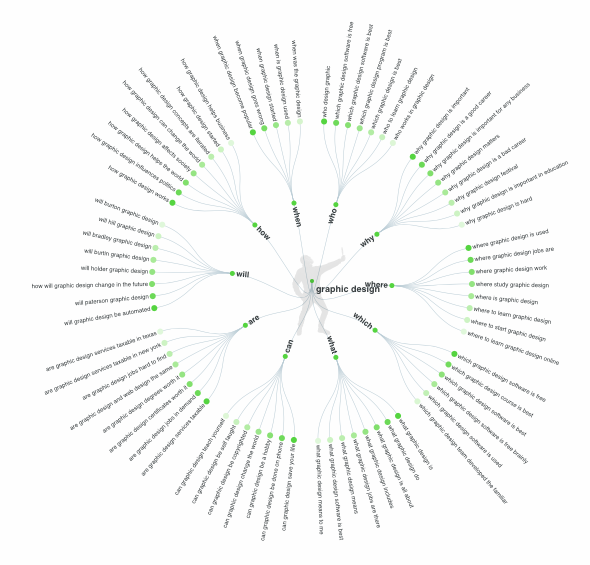
Answer the Public delivers search insights that help you understand the questions people are asking on any given topic. Throw in a seed keyword and ATP will return the who, what, where, and more for that search.
For example, this is an example of the ideas that you get when you select “Graphic Design” in New Zealand. Very insightful!